Nothing goes to us
No analytics, no usage statistics, no crash reports, no update checks, no registration. The author never receives your prompts, files, agents, processes or results.
TASK HIERARCHY AND EXECUTION ROUTING ORCHESTRATION NODE · DESKTOP · CONSOLE · HEADLESS
Theron turns Claude Code and local models into a team of AI agents – for software development, research, content, sales or whatever else you need. Tell THERON what you need and he puts the team together, or design your own processes visually. Run them in the app, from the console and cron, or on headless workers on your own servers – and answer their questions from anywhere.
Latest version –
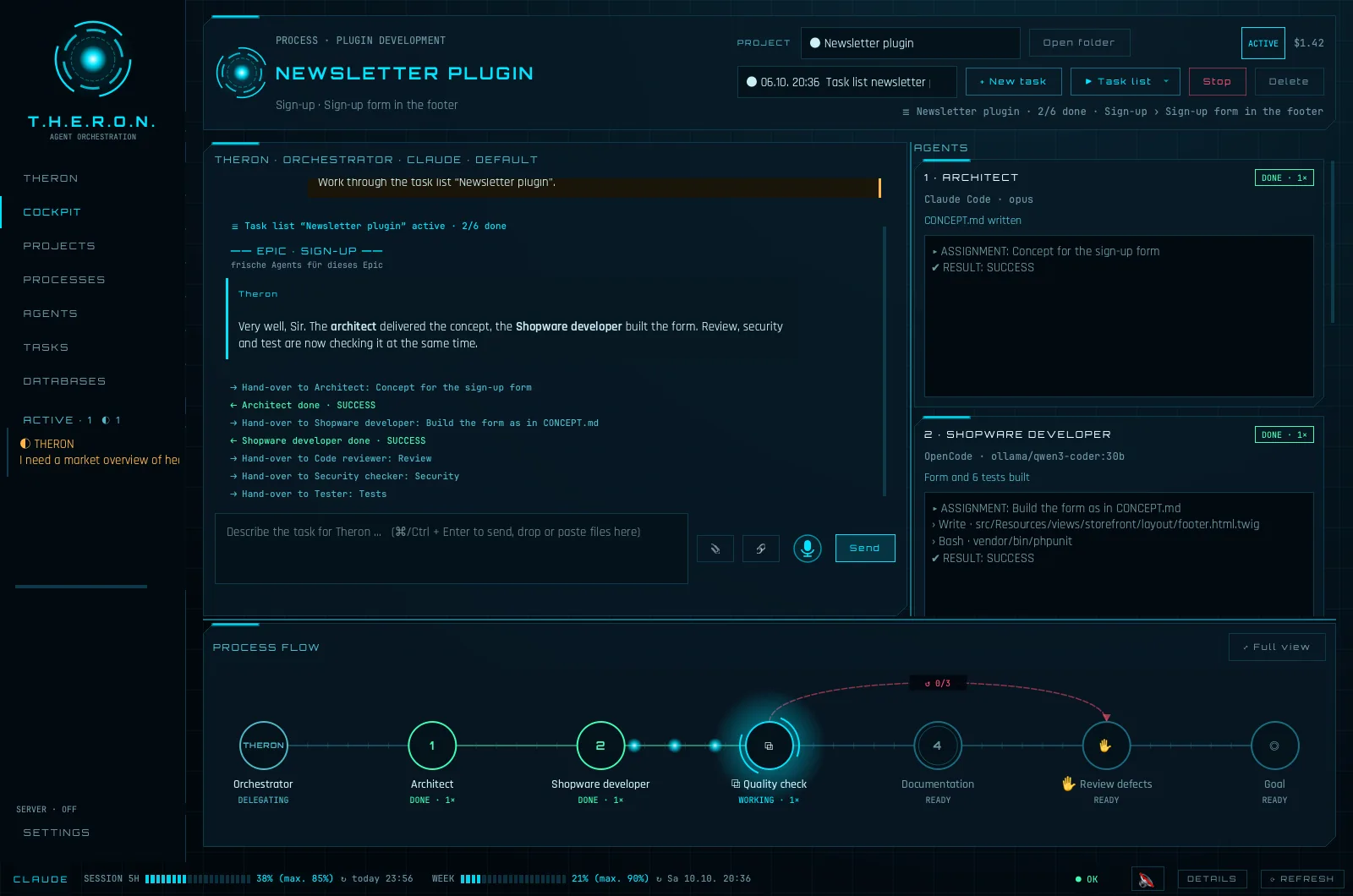
One prompt is good. A team with a process is better. Click a feature for the details.
From a single sentence to a fleet of workers – pick the way that fits. They all share the same agents, processes and Theron server.
🤵 Just tell THERON · For one-off jobs – no setup.
In a sentence, typed or dictated – with files or folders if you like.
Bundled questions with suggested answers: where to work, what should exist in the end, what is still open.
A process with the agents it needs – reusing your existing agents and processes where they fit.
You watch it work. Afterwards he tidies up the temporary team, or ↻ continues with a follow-up job.
⧉ Build your own processes · For recurring work, done exactly your way.
Any role you need – or let AI draft them. Each gets task, rules, model, knowledge and an optional memory.
Connect them visually or let AI propose it: success and failure paths, decisions, parallel work, loops, memories, databases, sub-processes.
A single prompt, a task list from the Konzepter or a template for a new customer – Theron takes it through the process.
Follow every step in the cockpit or in the browser and answer whenever Theron needs you.
⌨ Console & cron · For scheduled and scripted runs – no window.
In the app: Settings → Console. On servers: the stand-alone download.
A .theron file exported from the app, or by name from the library synced via your Theron server.
theron execute in a folder – from a shell, a CI job or cron.
Without -q Theron asks in the console and on the server; with -q it decides by itself.
theron execute "Plugin development" ./repo "Add a CSV export" -q
⇶ Headless workers · For long jobs that keep running while your laptop is closed.
theron --listen on any machine, or the Docker image with Claude Code built in – e.g. as a pod. It works with your Claude subscription.
Settings → Slave: host, port and token – the app checks the worker's fingerprint. From then on your app is its cockpit.
Tasks, THERON, Konzepter and every model call run on the worker. It keeps going and asks its questions on your Theron server.
Open the app again: it catches up and shows the current state of every agent – interact as usual.
docker run -d -p 7531:7531 -v theron:/data \
  -e THERON_SLAVE_TOKEN=… -e CLAUDE_CODE_OAUTH_TOKEN=… \
  mibexx1985/theron-headless
⚙ Automate via API · For your own tools and integrations.
Settings → Local API – reachable only from this computer, protected by a token.
Create projects, start tasks, create and fill task lists – from your own scripts.
Answer questions, read results and follow the events of every run.
E.g. sync a Trello board or turn incoming tickets into tasks. API documentation ›
Theron runs on your computer and sends nothing to us – no telemetry, no tracking, no account.
No analytics, no usage statistics, no crash reports, no update checks, no registration. The author never receives your prompts, files, agents, processes or results.
Agents, processes, projects, task lists, protocols and settings are kept in a local database on your computer. You can delete them at any time (Settings → Reset everything).
What agents work with – prompts, file contents, command output – goes to the model provider you configure: Anthropic for Claude (under your account and Anthropic's terms) or the provider set up in OpenCode. With local models via Ollama it stays on your computer.
Dictation is transcribed by Whisper on your computer; no audio is sent anywhere. Only once, at the first dictation, the speech model is downloaded from Hugging Face. Speech output uses your system's voices.
Only if you switch on live sync, Theron sends run status, chat, agent results, Claude usage, computer name and version to the Theron server that you operate yourself – encrypted when you use HTTPS.
A headless worker runs on a machine you choose. App and worker talk directly – TLS with the worker's own certificate (the app checks its fingerprint) plus a token. Nothing passes through us; the worker image contains no credentials – you pass your Claude login when you start it.
No cookies, no tracking, no external fonts or scripts. Your language choice and the download checkbox are stored only in your browser. Downloads are delivered by this server. Like every web server it processes technically necessary access data (e.g. IP address, time) in its logs.
Latest version –
Theron lets AI agents (Claude Code, OpenCode and the models behind them) work autonomously on your computer. By default they may read, create, change and delete files, run commands and access the network – in the working directory and, depending on your prompts and settings, beyond it. AI can make mistakes, misunderstand instructions or act in unexpected ways and can thereby damage or delete data, software or your system.
Theron is provided “as is”, without any warranty. Use is entirely at your own risk. To the extent permitted by law, the author accepts no liability for any damage, data loss, costs or other consequences arising from the use of Theron or the AI agents it controls.
Theron itself does not share any data with the author or third parties and has no telemetry. Data only leaves your computer towards the AI providers and the Theron server that you configure yourself – see Privacy.
T.H.E.R.O.N. stands for “Task Hierarchy and Execution Routing Orchestration Node”. Theron is an independent project and is not affiliated with Anthropic or OpenCode.
Apple Silicon (M1 and newer) · macOS 13+ · DMG
Apple Silicon (M1–M4)For Macs with Apple Silicon (Apple menu → About This Mac: “Chip Apple M…”). Intel Macs are no longer supported.
Open the DMG and drag Theron into Applications. The app is not notarised by Apple, so macOS blocks the first start: click “Done”, then System Settings → Privacy & Security → “Open Anyway” (at the bottom) and start Theron again. Alternatively in Terminal: xattr -dr com.apple.quarantine /Applications/Theron.app
Windows 10/11 · 64-bit · Installer
Download for WindowsRun the installer – no admin rights needed. SmartScreen: “More info” → “Run anyway”. Theron then appears in the Start menu.
Portable ZIPWithout installation: first extract the ZIP (right-click → “Extract all …”), then start Theron.exe in the extracted folder – not directly from the ZIP.
x86_64 or ARM64 · glibc 2.35+ (Ubuntu 22.04+, Debian 12+, Fedora 36+) · AppImage
x86_64 (Intel / AMD) ARM64Make it executable and start it: chmod +x Theron-*.AppImage && ./Theron-*.AppImage. Microphone input needs PipeWire or PulseAudio (standard on current desktops).
Docker image · amd64 or ARM64 · web UI and live sync · also on Docker Hub: mibexx1985/theron-server
amd64 (x86_64) ARM64docker run -d -p 8765:8765 -v theron-server:/data \ -e THERON_ADMIN_USER=admin -e THERON_ADMIN_PASSWORD=… \ mibexx1985/theron-server # offline: docker load -i theron-server-image-amd64.tar.gz
Docker image with Claude Code – Theron as a slave on a server, controlled from your app · also on Docker Hub: mibexx1985/theron-headless
amd64 (x86_64) ARM64docker run -d -p 7531:7531 -v theron:/data \ -e THERON_SLAVE_TOKEN=… -e CLAUDE_CODE_OAUTH_TOKEN=… \ mibexx1985/theron-headless # offline: docker load -i theron-headless-image-amd64.tar.gz
Create the Claude token once locally with claude setup-token – it uses your Claude subscription and its limits, no API costs. In the app: Settings → Slave with host, port 7531 and the token, then check the fingerprint against the container's log. Optional: THERON_SERVER_URL and THERON_SERVER_TOKEN for questions in the web UI.
The “theron” command without the app – for scripts, CI and cron jobs, no GUI
Linux x86_64 Linux ARM64 macOS Apple Silicon Windows x86_64tar xzf theron-cli-*.tar.gz ./theron/theron config server https://… TOKEN ./theron/theron config sync on ./theron/theron sync ./theron/theron execute "Process" ./repo "Task" -q
Log in to Claude once on that machine (claude login). A process runs from a .theron file (exported in the app) or by name from the synced library. Without -q Theron asks in the console and on the Theron server; with -q it decides by itself. In the desktop app: Settings → “theron” command sets it up on your computer. macOS: xattr -dr com.apple.quarantine theron